
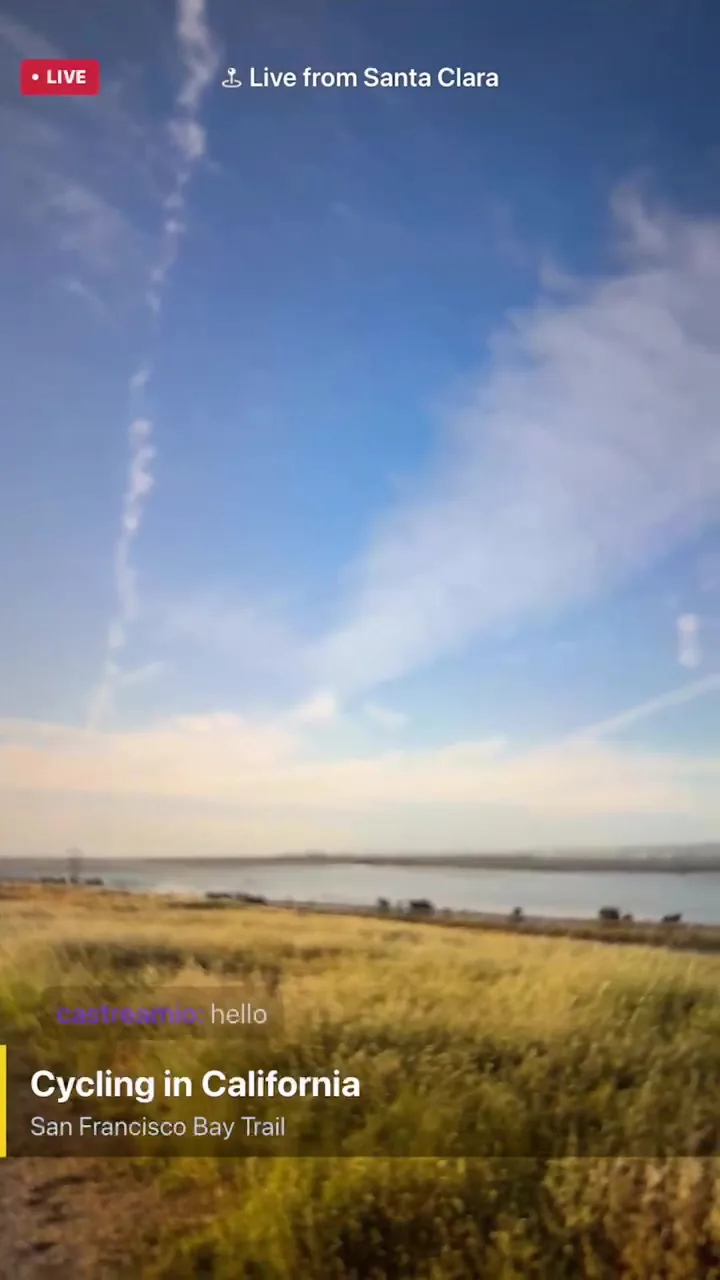
Overlays for mobile live streaming
With Castream Overlays, your phone stops being just a camera and starts acting like a pocket-sized control room.
You’re not just going live anymore, you’re directing the whole damn show in real time.
Add context, personality, and visual storytelling to your stream without touching OBS, laptops, or any of that spaghetti setup.
What you can do with overlays
Whether you’re streaming a podcast, a live event, a church service, or just vibing with your audience, overlays let you shape the experience instead of just broadcasting it.
You can:
- Introduce guests and segments like an actual production
- Show where you are, what you’re doing, and why it matters
- React to chat live without breaking flow
- Layer visuals on top of your video like a mini TV studio
All from your phone. No second device. No hacks.
New in this update
🎥 Picture-in-Picture (PIP) camera
Run multiple camera angles at once.
Show your face while pointing the rear camera at something else, or switch perspectives without killing the stream.
🧲 Draggable overlays
Move everything exactly where you want it.
No rigid layouts, no “close enough” positioning. Just drag, place, done.
🏷️ Lower thirds and titles
Introduce people, topics, or segments cleanly.
Make your stream feel structured instead of chaotic.
📍 Live location overlay
“Live from ___” — automatically.
Perfect for events, IRL streams, travel, or anything that benefits from context.
🎨 Camera filters & 🎙️ voice effects
Add style or chaos, depending on your mood.
From clean visual tweaks to full-on “why does this sound possessed” energy.
💬 Live chat overlay (multi-platform)
Pull messages from YouTube, Twitch, Facebook, etc.
Render them directly on your stream so your audience becomes part of the content.
⚡ Faster, more reliable streaming
Under the hood improvements so your stream doesn’t randomly decide to die mid-sentence.
Less jank, more uptime.
Why this matters
Most mobile streaming apps stop at “press go live.”
Castream lets you produce.
That’s the difference between:
- someone casually streaming
vs - someone building an actual show people stick around for
Known limitations
- Some UI elements are still being refined in landscape mode
- Certain overlay interactions may feel a bit experimental as we keep tightening things up
This is just the start.
You’re basically carrying a live production studio in your pocket now.