
Start streaming for free β€’ 7 days creator trial included β€’ No credit card required
Pricing
Explore
Help Center
Castream logo
Start free
One stream in. Every destination live.

CastreamDesktop multistreaming for OBS and any RTMP encoder

Connect OBS, Wirecast, vMix, XSplit, or any RTMP workflow and control distribution to YouTube, Twitch, Facebook, TikTok, Instagram, LinkedIn, X, and custom RTMP from the same Castream dashboard your mobile streams already use.
Start freeFREE
See creator plan
Built for creators, publishers, teams, and live producers
1 RTMP ingest→Multi-platform output
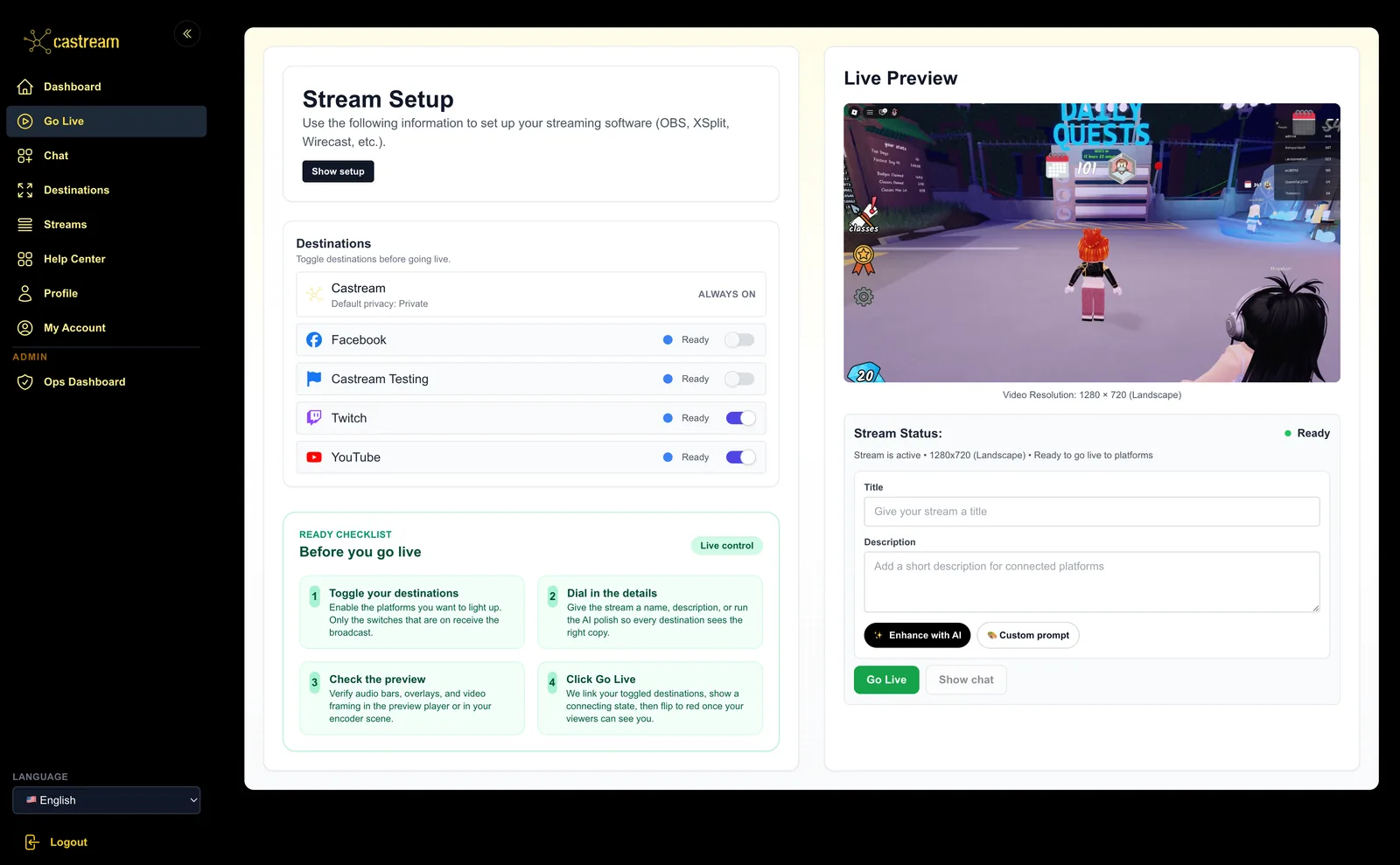
Web dashboard control
CastreamWeb dashboard control
Castream desktop dashboard with stream details, connected destinations, and chat tools
1 RTMP ingest→Multi-platform output
Web dashboard control
Works with your encoder

How Castream Desktop works

1. Send your stream via RTMP

Point OBS or any RTMP-compatible encoder at your Castream ingest URL and stream key.

2. Manage destinations in the dashboard

Enable platforms, update settings, watch stream health, and keep distribution under control from one place.

3. Go live everywhere at once

Castream fans your single encoder feed out to every destination you have connected.

Fits your existing production stack

Keep OBS scenes, overlays, audio routing, and hardware exactly as they are. If it outputs RTMP, it fits.

Reliable ingest and distribution

Use a stable ingest path and let Castream handle the distribution layer instead of rebuilding it per platform.

One dashboard for desktop and mobile

Manage destinations, monitor live status, and switch between workflows without learning a second product.

One stream, every major destination

YouTube
Twitch
Facebook
Facebook Pages
TikTok
Instagram
X (Twitter)
LinkedIn
Custom RTMP
+ More

Why creators use Castream Desktop

Single ingest instead of separate per-platform go-live flows
OBS-friendly setup with a clean RTMP endpoint and stream key
Destination control from the same dashboard used across the rest of Castream
Faster review for teams that want to see the actual product before signing up
A clean bridge between desktop production and mobile backup workflows

OBS setup

  • β€’ Go to Settings -> Stream
  • β€’ Choose Custom
  • β€’ Server: rtmp://example-381.castream.io/xyz123
  • β€’ Stream Key: your unique key from the dashboard
  • β€’ Start streaming and let Castream handle the distribution

Dashboard controls

  • β€’ See stream status in real time
  • β€’ Toggle destinations without touching your encoder
  • β€’ Manage connected accounts and RTMP outputs

Ready to turn one OBS feed into a real multistream setup?

Start free, connect your encoder, and send your live show everywhere from one dashboard.

See creator plan
Castream

Broadcast everywhere with one stream key. Mobile ingest, OBS, and unified chat in one control room.

7-day Creator trial Β· No watermark
Use Cases
  • Church streaming
  • IRL vloggers
  • Podcasters
  • Musicians & DJs
  • Fitness coaches
  • Sports clubs
  • Educators
  • Gaming
Features
  • Desktop Streaming
  • Mobile Streaming
  • Scheduled Streams
  • Unified Chat
  • Overlays
  • AI Tools
  • Stream Recordings
  • Chat Insights

Plans

  • Pro
  • Creator
  • Free

Resources

  • Changelog
  • Blog
  • Help Center
  • About

Legal

  • Terms of Service
  • Privacy Policy

Get the App

Google PlayApp Store

Β© 2026 Castream. All rights reserved.